

For a successful cloud migration, a small or medium-sized business should first take stock of its applications and data, set clear objectives, choose a strategy for each application, secure access, migrate in phases with testing, then train its teams and monitor costs. This guide is for SME owners and managers, in Morocco and internationally, who want to move forward methodically, even without a large in-house IT team.
Cloud migration means moving your business applications, email, files and databases from servers installed on your premises (or with a hosting provider) to a cloud computing platform. Done well, it can make remote work, team collaboration and access to company tools from any connected device easier.
Benefits you can aim for, depending on your situation:
- Flexibility: adjust resources to match activity, without buying hardware in advance.
- Security: rely on tools such as encryption and automated backups, provided they are configured correctly.
- Agility: deploy new applications and receive updates more easily.
- Compliance: choose where your data is hosted; check the rules that apply in the countries where you serve your customers.
Step 1: start with an IT audit
Any move to the cloud should begin with a review of your information system. Without an accurate inventory, you risk forgetting a critical application or underestimating the volume of data to transfer. Our IT audit for SMEs guide explains how to structure this first step.
What to audit:
- The business applications in use (accounting, CRM, ERP, inventory management, email, office software).
- Physical servers on your premises and those hosted by a third party.
- Databases (types, volumes, update frequency).
- Current hosting, maintenance and licensing invoices.
- Software contracts (renewal dates, termination terms, portability clauses).
- Your current security level: antivirus, firewall, backups, password policy.
- Files shared on the internal network and their access rights.
Understanding cloud service models
A migration can target a public cloud, a private cloud or a hybrid environment. Three service models shape what is on offer:
- SaaS (Software as a Service): you use a complete online application without installing anything, such as business email, a CRM or subscription invoicing software. This is often the entry point for SMEs.
- PaaS (Platform as a Service): your team or your provider deploys an application on a preconfigured platform, without managing servers or operating systems.
- IaaS (Infrastructure as a Service): you rent virtual servers. You keep control of the system and installed software; the provider manages the physical hardware.
The cloud generally works on a subscription or pay-as-you-go basis, which turns part of your hardware purchases into recurring expenses. Compare the total cost over time, not just the monthly price.
Choosing between public, private or hybrid cloud
The right model depends on your budget, the sensitivity of your data, location constraints and your compliance obligations:
- Public cloud: infrastructure shared between several customers, billed on usage. Suited to getting started quickly with a lower initial investment, especially for email, your website or collaboration tools.
- Private cloud: an environment dedicated to your company. More expensive, but it gives you more control over configuration, security and data location.
- Hybrid cloud: combines on-premises or private resources with public cloud. You can keep your most sensitive data in a controlled environment and benefit from public cloud flexibility for the rest.
For many small and medium-sized businesses, the starting point remains SaaS solutions, with a possible move to a hybrid model as needs become clearer.
Clarify your objectives before migrating
Before choosing a technology or a provider, set a few measurable objectives. They will guide your priorities and the project's success criteria. Examples:
- Control infrastructure costs: compare the current cost (hardware, maintenance, licences) with the target cost.
- Improve availability: reduce outages caused by a single server with no redundancy.
- Speed up go-lives: deploy a new application or module faster.
- Support hybrid work: give access to the ERP or CRM from several sites or on the move.
These objectives determine which applications to migrate first, which cloud model to choose and what budget to plan for each phase.
Inventory applications, data and dependencies
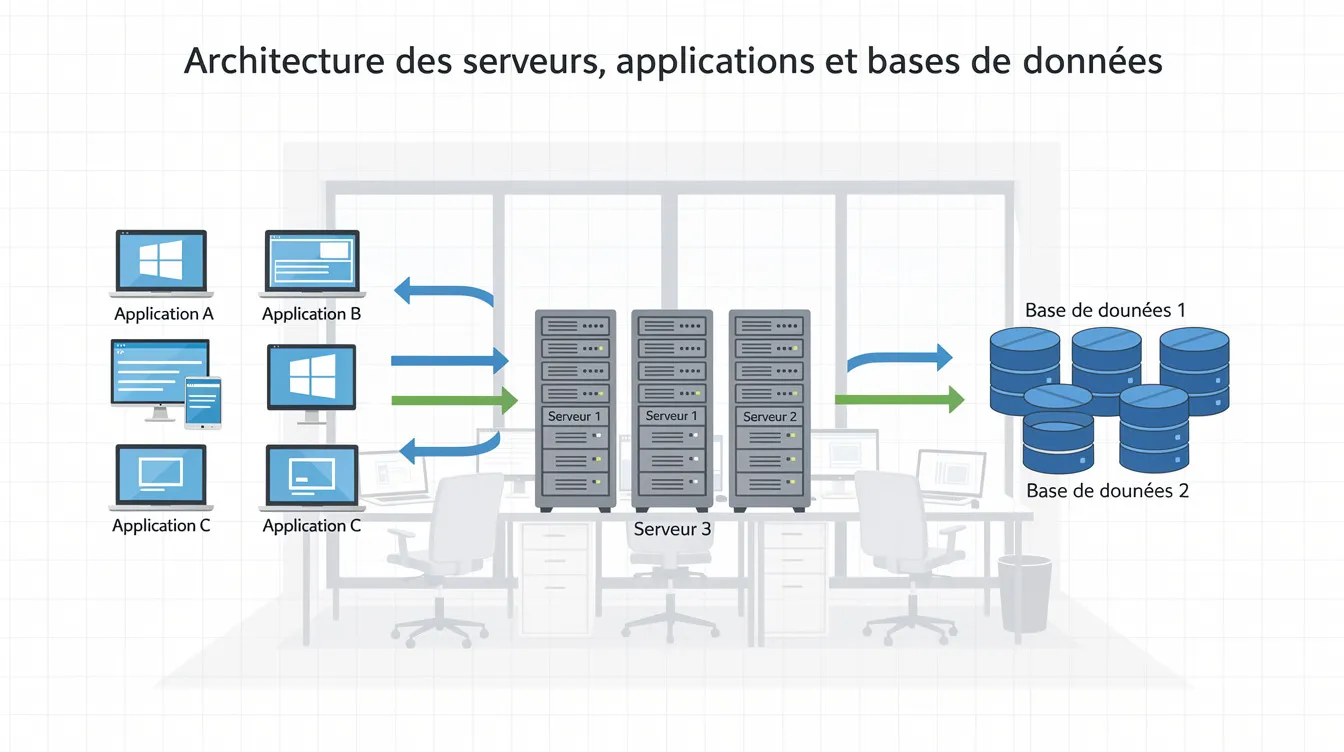
A detailed map prevents unpleasant surprises on cutover day. An unidentified dependency can block a service or cause data loss. Inventory checklist:
- Each application, with its number of users, frequency of use and data volume.
- Connections between applications: invoicing linked to the CRM, e-commerce site linked to the ERP, booking system linked to a payment service.
- API integrations (payment, logistics, accounting).
- Internal and external data flows (imports, exports, synchronisations).
- Technical dependencies: VPN, network printers, SSL certificates, third-party software.
- The data volumes to transfer for each database and storage space.
- Users and their access roles.
Define a migration strategy for each application
Each application in your inventory can follow a different approach:
- Rehost (lift and shift): move the application as it is to a cloud virtual machine, without changing the code. Fast, and useful when a server is reaching end of life.
- Replatform: make light adjustments, for example replacing a database installed on your server with a managed database service.
- Refactor: redesign the application to take advantage of cloud services. Takes longer; reserve it for applications that justify it.
- Repurchase (SaaS): replace locally installed software with an equivalent online service.
- Retire: switch off applications or modules that are no longer used.
- Retain: keep certain systems on premises, at least temporarily, when compliance or technical dependencies require it.
Lift and shift on its own is not always the best long-term option, but it can be a first step. The ideal approach often combines several strategies.
Build a phased roadmap
A gradual migration, in waves, reduces the risk of disruption. Start with the least critical and simplest applications:
- Wave 1: email and shared files.
- Wave 2: CRM, collaboration tools, web applications.
- Wave 3: ERP, invoicing, custom business applications.
To rank applications, ask four questions: does the business stop if the application goes down? How many dependencies does it have? What is the risk during cutover? Can you easily roll back to the old system?
Schedule cutovers during quieter periods and avoid migrating everything at once. The total duration depends on the scope; it should be estimated after the inventory. Each wave should include:
- A schedule with start and end dates.
- Named owners (internal and provider-side).
- Functional and performance tests.
- A documented rollback plan.
Put security and compliance at the heart of the project
Security must be considered from the outset. Prepare the target cloud environment with suitable security, network and governance rules before migrating your applications to it.
In the cloud, responsibility is shared: the provider secures the physical infrastructure, and your company remains responsible for access, data and configurations. Practical actions:
- Encryption: enable encryption for data at rest and in transit.
- Identity and access: set up multi-factor authentication, assign permissions by role and review access regularly.
- Backups: configure automated backups, test restoration regularly and document a business continuity plan.
- Logs: enable logging of sign-ins, configuration changes and access to sensitive data.
- Compliance: check the applicable rules (personal data protection, data location) and set out the provider's obligations in the contract.
- Internet connection: your tools will depend more on the network; plan a backup solution for critical applications.
Practical cloud migration checklist
Preparation
- Carry out an audit of your information system.
- List software contracts and their renewal dates.
- Set measurable objectives.
- Rank applications by criticality.
- Map dependencies, APIs and data flows.
Choices and design
- Choose the cloud model for each application.
- Choose the migration strategy for each application.
- Prepare the secure target environment.
- Write the migration plan with schedule, owners and milestones.
- Plan a budget covering transfer, storage, training and support.
Execution and validation
- Migrate in waves.
- Test each migrated application (features, performance, security).
- Check integrations and data flows.
- Get user sign-off before shutting down the old environment.
After the migration
- Train your teams.
- Set up cost and performance alerts.
- Review resource sizing regularly.
- Shut down old servers and licences that are no longer needed.
Train your teams and support the change
Migration is not just an IT matter: management, finance, operations and sales teams all change tools and habits.
- Organise training adapted to each person's level.
- Produce step-by-step guides for everyday tasks.
- Appoint a go-to person in each department, trained first.
- Provide extra support after each cutover.
- Announce each wave: who is affected, when, what changes and how to ask for help.
Training should cover good security practices (passwords, multi-factor authentication, file sharing) and the procedure to follow in the event of an incident.
Monitor performance and costs after the migration
The project does not end on cutover day. Monitor response times, availability and user experience, and compare the results with the objectives set at the start.
On the cost side, oversized resources, obsolete data stored unnecessarily or unused licences can drive up the bill. Useful actions:
- Set up budget alerts.
- Adjust resource sizes to actual usage.
- Use managed services to reduce administration tasks where relevant.
- Automatically shut down test environments outside working hours.

Pitfalls to avoid
- Focusing only on cutting costs: bandwidth, licences, training and support must be budgeted for.
- Neglecting security: without multi-factor authentication and access reviews, the company is exposed.
- Forgetting dependencies: migrating a CRM without checking its links to invoicing can bring operations to a halt.
- Underestimating training: train before each cutover, not after.
- Ignoring reversibility: document your choices, favour standard formats and plan portability clauses.
- Not testing: plan a pilot phase with a small group of users.
- Migrating everything at once: move forward in waves.
- Stopping monitoring: keep tracking costs and performance after the migration.
How UnzipTech can help
UnzipTech is a Fez-based company supporting businesses in Morocco and internationally: IT consulting and digital transformation, web and mobile development, custom software (ERP, CRM, business tools), AI integration and scalable, high-availability hosting for critical applications.
Our approach follows four steps:
- Listening to and analysing your needs.
- Design and validation.
- Delivery with regular check-ins.
- Handover, training and follow-up.
We offer a free tailored quote after analysing your needs, phased payment, training and documentation with each delivery, as well as maintenance and support contracts.
Explore our services or contact us for a free quote.
FAQ: cloud migration for SMEs
What is cloud computing for an SME?
It means using servers, storage and software accessed over the Internet instead of hosting them on your premises. In practice: email, CRM, ERP or shared files accessible from a browser or an app.
How long does a cloud migration take?
It depends on the scope, the number of applications and their dependencies. Migrating email and files is generally simpler than migrating an ERP or custom applications. The initial inventory makes it possible to estimate a realistic schedule.
Is the cloud safer than a server on our premises?
The provider secures the physical infrastructure, but the security of access, data and configurations remains your responsibility. A well-configured cloud service can be better protected than a poorly maintained local server; it all depends on configuration and monitoring.
Do we need to migrate the entire information system?
Not necessarily. Some systems can stay on premises when compliance or technical dependencies require it. Start with the simplest applications and expand from there.
How can we avoid dependence on a single provider?
Document your technical choices, favour standard data formats and open APIs, and include reversibility and data portability clauses in the contract.
Which data should be analysed before it is moved?
Personal data of customers and employees, financial data, health data and any data subject to location rules. Check the applicable rules before migrating it.
When should we bring in a provider?
When your team does not cover all the skills required: audit, architecture, security, development. UnzipTech can support you from audit through to follow-up, with a free quote after analysing your needs.
Conclusion
A successful cloud migration is prepared: audit, objectives, a strategy for each application, security, migration in waves, training and cost monitoring. Start with an IT audit for SMEs to map your situation, then request a free quote from UnzipTech if you would like support.